Keep the switches you already know while adding app, voice and automation control. In many Enfield homes, suitable Shelly, Sonoff or Aqara products can be installed without new cable runs or a full rewire, and selected WiFi or Matter-over-WiFi devices need no separate hub. We check the wiring, load, network and chosen ecosystem around terraces across southern enfield and semis with lofts & extensions before confirming the right option.
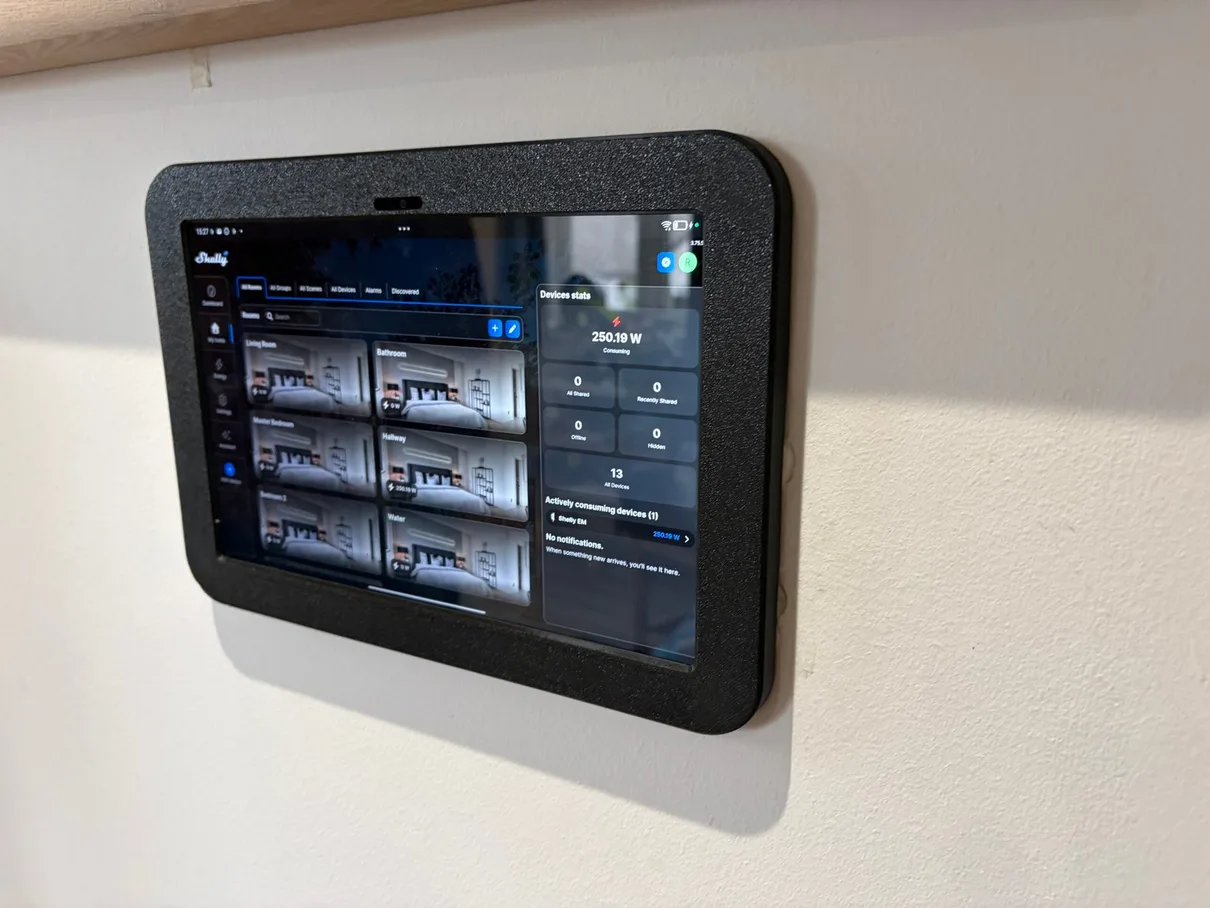
Real smart-home work from our portfolioA completed wall-mounted smart-home dashboard — useful controls kept visible and understandable.
The home before the technology
One Connected Plan, With Familiar Control.
NICEIC-Registered Electrician D609991. Wiring, connected loads, heating interfaces and network requirements are checked before equipment is selected. Applicable electrical work is inspected, tested and certified.
SurveyedWiring, loads and network
Manual controlFallback behaviour agreed
ConfiguredRooms, users and automations
12 monthsWorkmanship guarantee
The questions customers ask first
Your Smart Home Installation Questions Answered in Enfield
Worried about losing familiar controls, replacing everything, unreliable apps or damage to finished rooms? Here is what we check before recommending any smart-home equipment.
Explore the four questions01 / 04
01
Will my lights and heating still work manually?
Familiar controls remain part of the plan
Manual control remains part of the design wherever the selected equipment and existing wiring support it. We check how each light, heating zone or connected device is operated now, then demonstrate both normal manual use and the smart controls at handover.
02
Will I need to replace all my existing switches and equipment?
Compatible equipment can often stay
Often, no. Suitable Shelly, Sonoff or Aqara relays can retain an existing wall switch, and selected no-neutral products can avoid new cable runs or a full rewire. We check the wiring, available space, connected load and switching arrangement before identifying what genuinely needs to change.
03
What happens if the WiFi, internet or app stops working?
Outage behaviour is agreed before installation
It depends on the exact products. Local switches and controls can continue without the internet where the design supports that, while remote access, cloud automations or voice control may pause. We explain those dependencies before installation so the fallback is understood.
04
Will the installation damage my walls or decoration?
Every visible alteration is discussed first
We inspect the wiring and likely equipment positions before agreeing the work. Existing switch positions and accessible routes are used where practical, and any deeper box, new cable route or visible alteration is discussed first. Working areas are protected and applicable electrical alterations are tested.
The useful testIf the system cannot be explained in plain language—or leaves the household helpless when one app fails—it has not been planned far enough.
Start with the moment that should feel easier
Smart Home Problems We Solve in Enfield
The right design starts with a household need, then checks the wiring, heating, network and ecosystem needed to support it.
Swipe through the real situations ← →
01Manual first
The household wants app control without losing the wall switch
We inspect the existing switch arrangement and choose a compatible control method only after confirming how familiar manual use will remain.
02Useful zones
Heating schedules no longer match the way rooms are used
The heat source, existing programmer, valves and occupied rooms are checked before compatible thermostats or room controls are proposed.
03One clear system
Several brands have become several separate apps
Supported products can be coordinated through Home Assistant or another suitable platform, with exact integrations checked before they enter the scope.
04Purposeful automation
Motion, door or temperature sensors should trigger something useful
Every sensor is tied to a clear household outcome, with timing, override and failure behaviour agreed rather than left as a novelty.
05Plan before finishes
An extension or refurbishment is opening useful routes
Power, data, controls and future provision can be coordinated while access is available, avoiding unnecessary alteration after decoration.
06A proper handover
The home needs to remain understandable for every user
Rooms, scenes, users, accounts and fallback controls are tested and explained so the finished system is not dependent on one person remembering how it works.
Useful control, room by room
What Can We Make Smart in Your Enfield Home?
Lighting, heating, sensors, selected appliances and scenes can work together—but only where each addition has a clear purpose and verified compatibility.
Swipe through the smart-home options ← →
01
Lighting, Dimming & Scenes
Control suitable lights from the wall, app or voice assistant; create useful evening, away or bedtime scenes; and retain a clear manual route wherever the selected equipment supports it.
02
Heating & Room Control
Nest, Hive, Tado, Drayton Wiser and Honeywell evohome can be considered after the boiler, hot-water controls, programmer, valves and required zones are checked.
03
Sockets & Selected Appliances
Suitable smart plugs, relays and energy-monitoring devices can add schedules, remote control or usage information without pretending every appliance should be automated.
04
Presence, Motion, Door & Climate Sensors
Aqara and other compatible sensors can support lighting, alerts, comfort and safety routines when the trigger, delay and manual override are defined first.
05
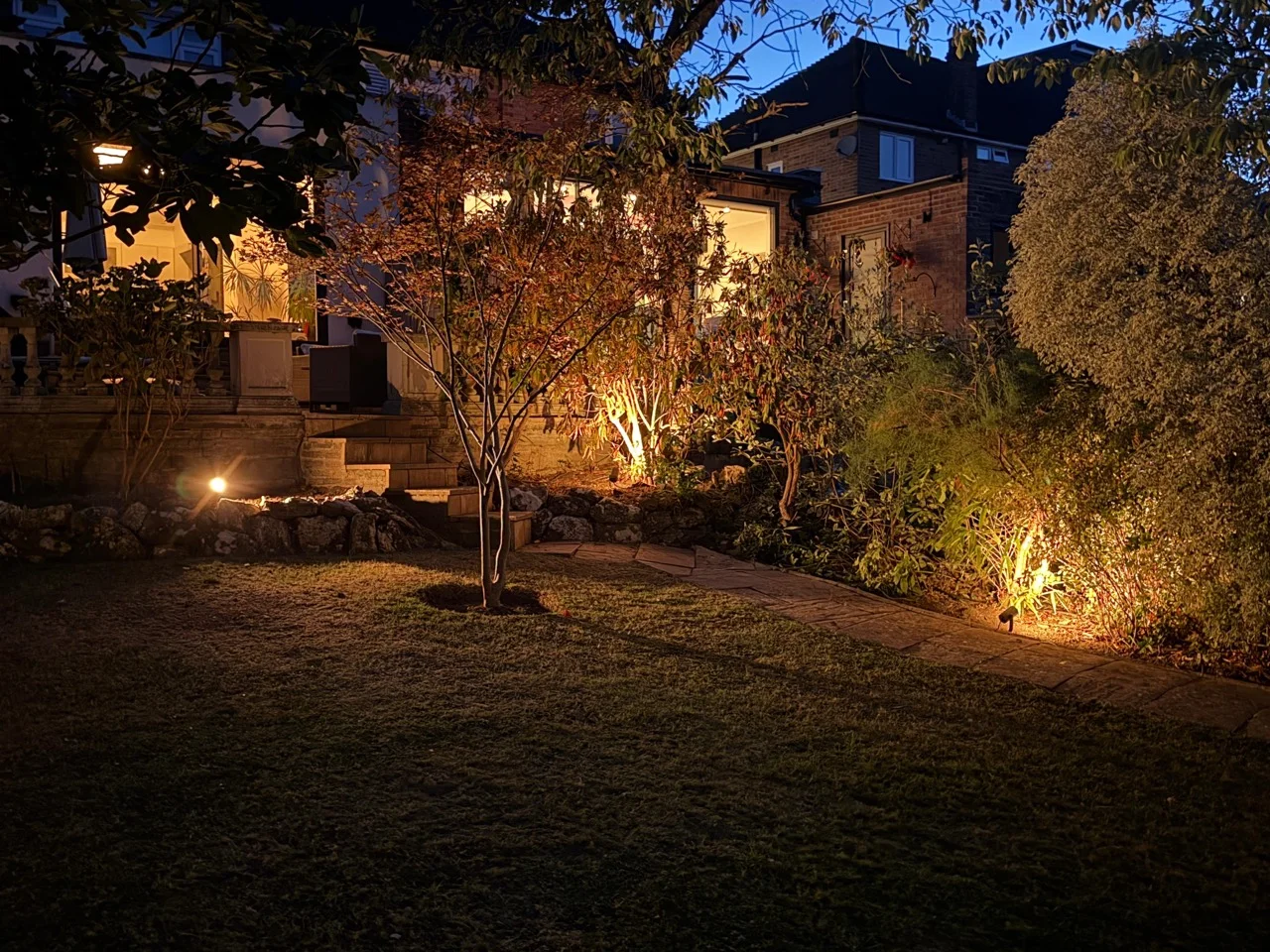
Blinds, Garden Lighting & Outdoor Routines
Supported motors, lighting controls and sensors can be coordinated around access, weather exposure, safe electrical provision and the way the space is actually used.
06
Dashboards, Voice & Home Assistant
Apple HomeKit, Alexa, Google Home, SmartThings and Home Assistant can provide different control routes, subject to the exact model, bridge, firmware and feature required.
Real installation detail
Real Smart Home Work From North London Homes.
Completed dashboards, controls, sensors and labelled equipment from the Rudi Electrics portfolio. Each photograph shows a different part of a real smart-home installation.
Swipe through genuine installation details01 / 05
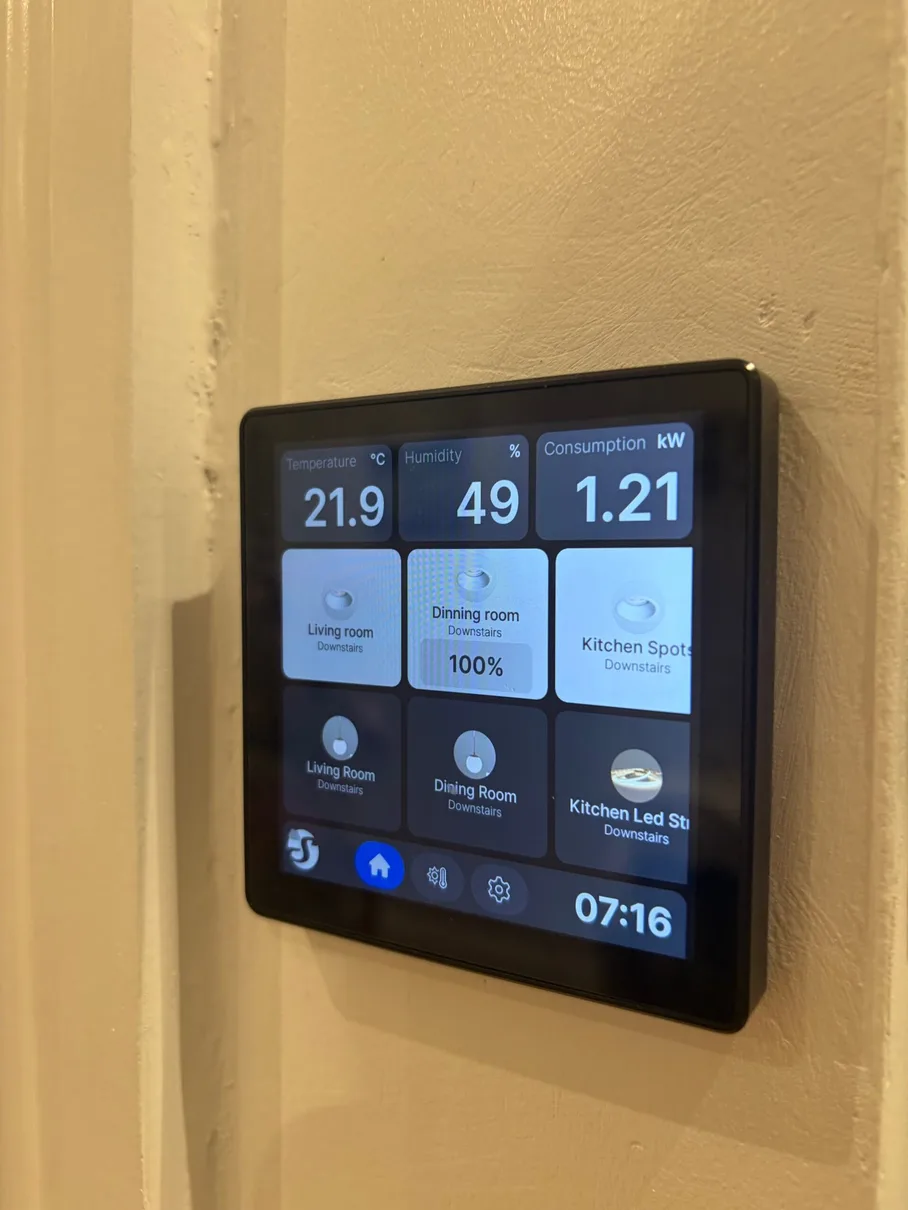
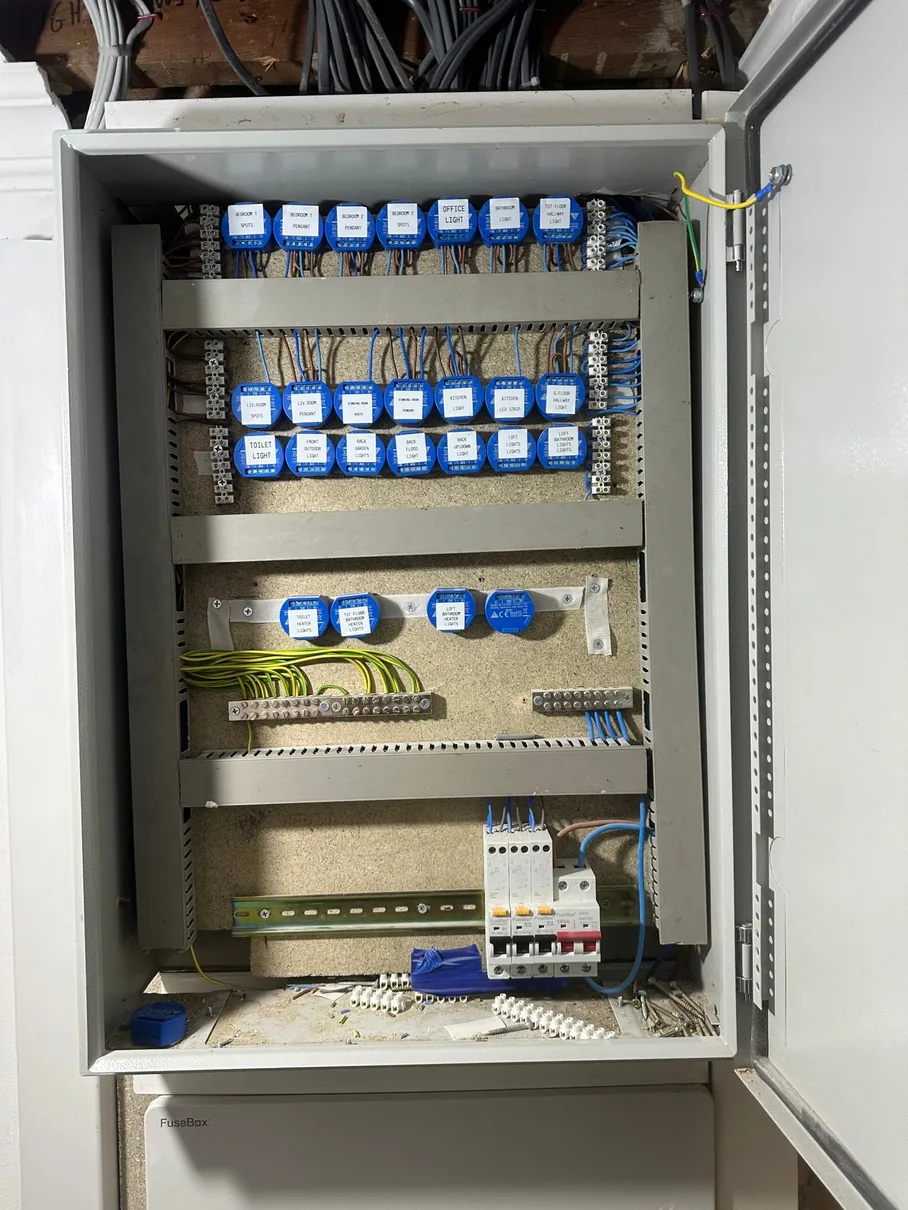
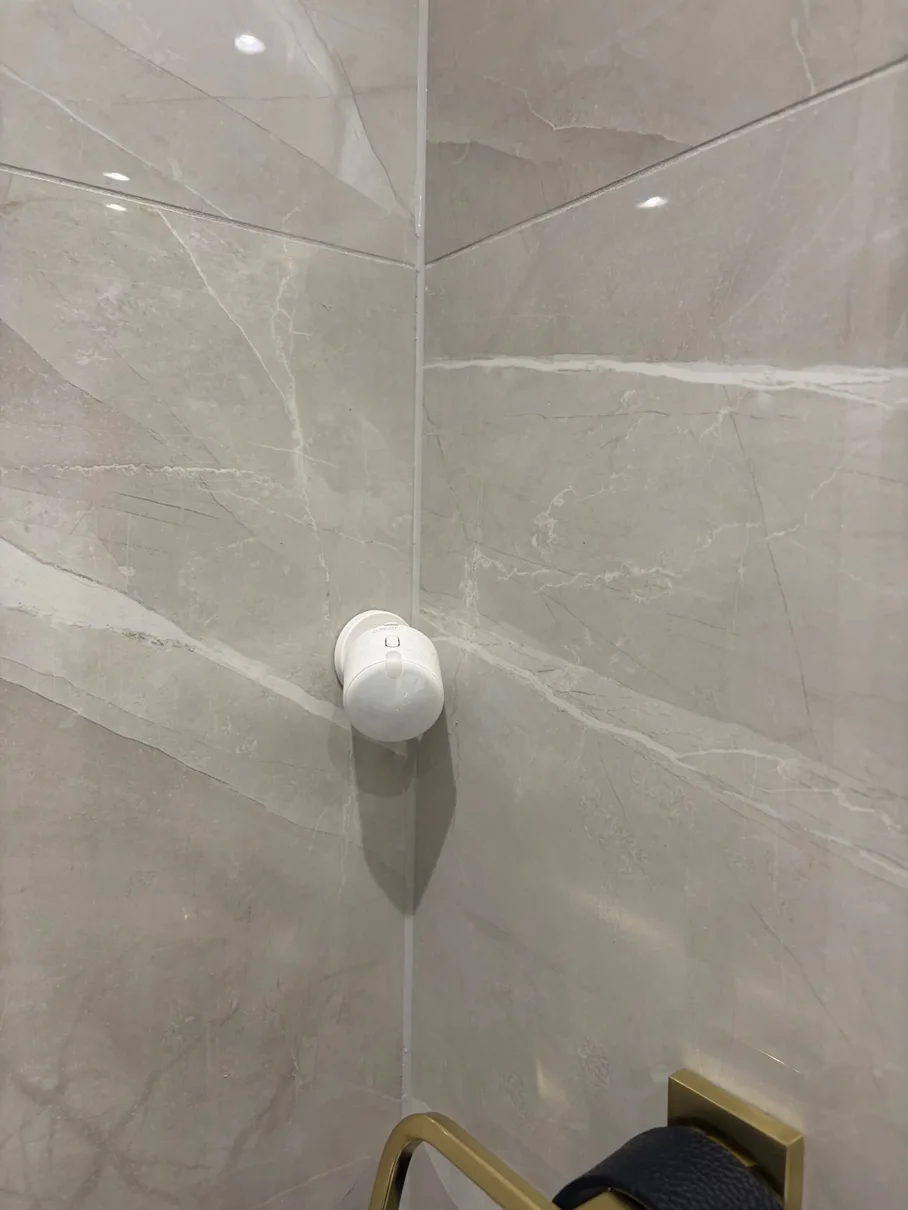
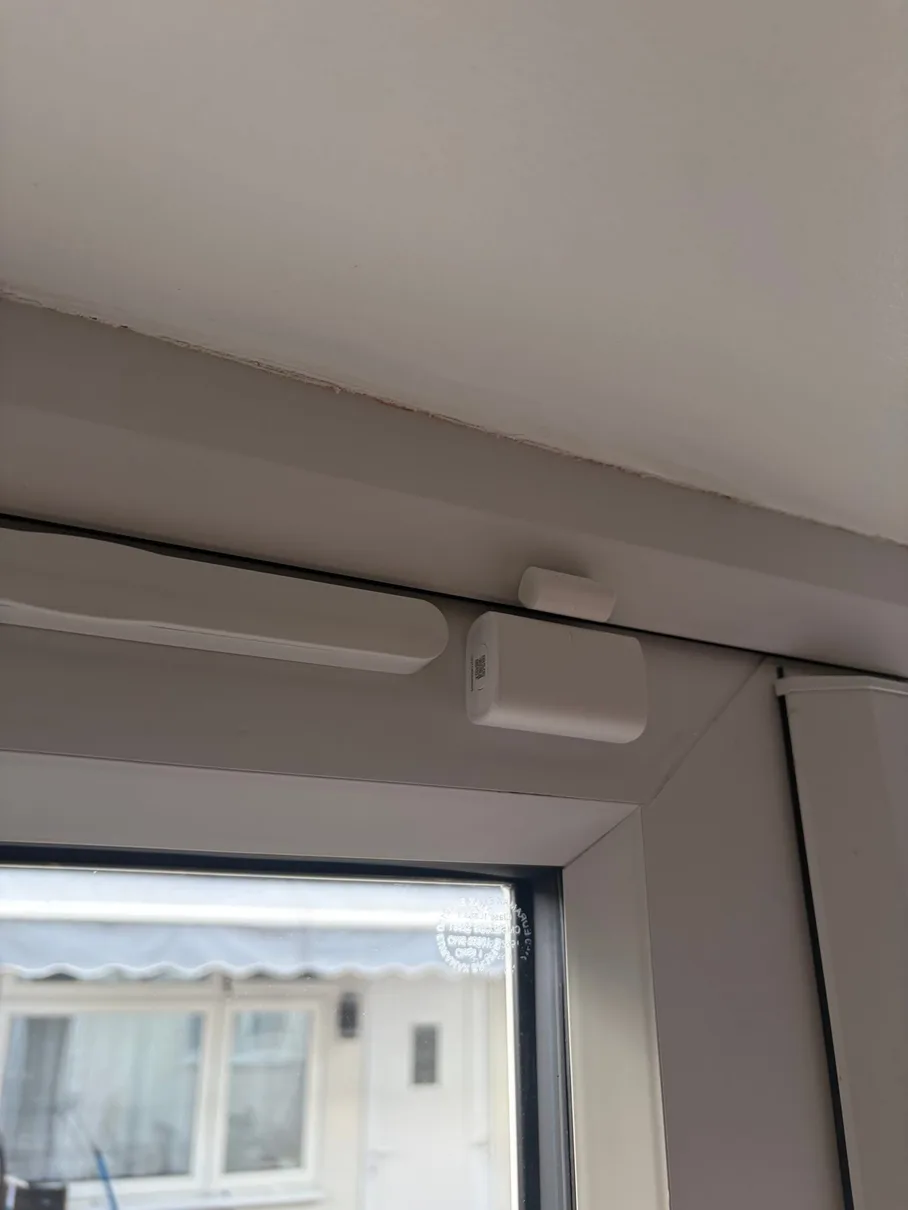
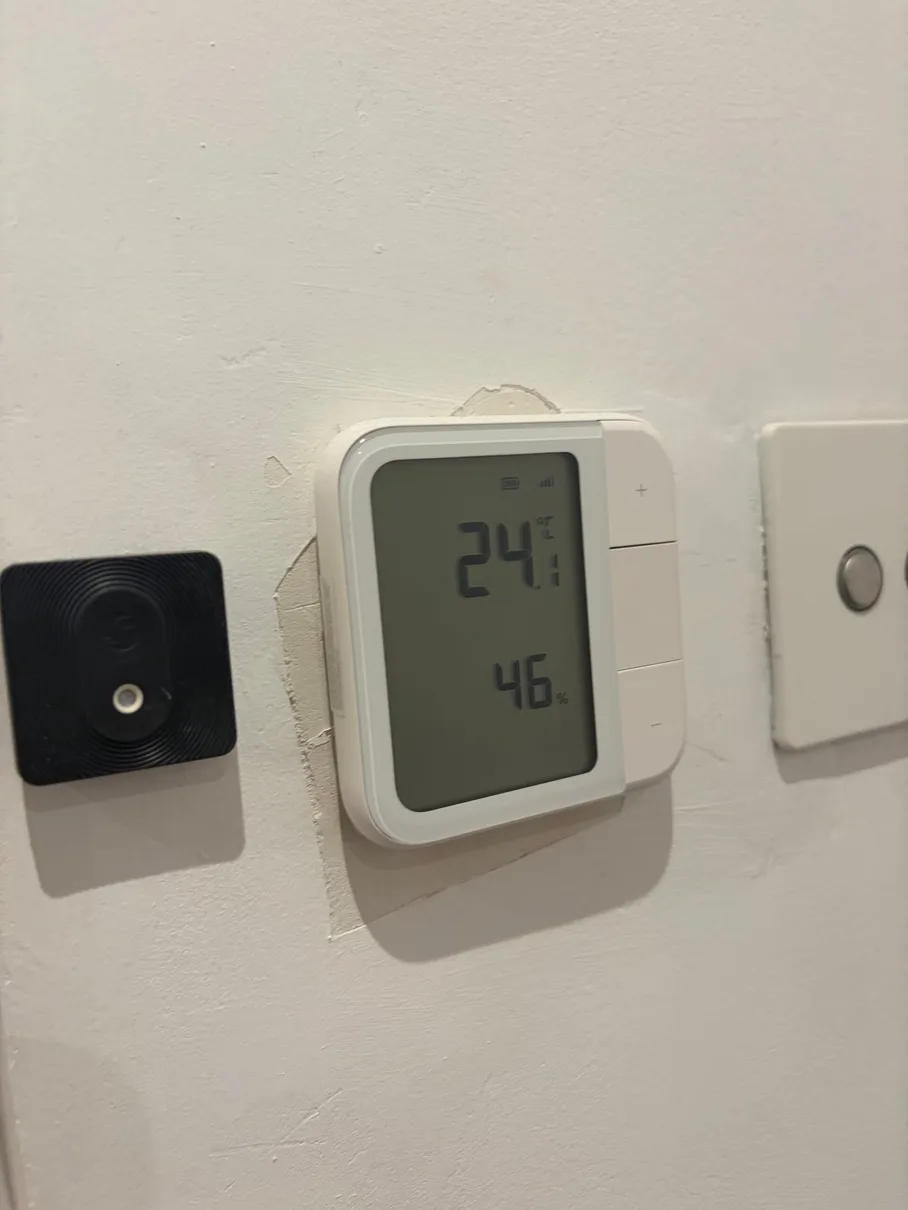
Installation detail 01Lighting, temperature and energy at a glanceA dedicated screen gives the household an option beyond opening a phone app.Installation detail 02Labelled whole-home lighting controlsRelays and circuits kept identifiable so the system can be understood and maintained.Installation detail 03Discreet bathroom motion sensingAutomatic lighting can respond to the room while a normal control remains available.Installation detail 04Door and window awarenessA small contact sensor can support alerts, heating logic and simple household routines.Installation detail 05Room conditions made usefulTemperature and humidity readings can inform heating, ventilation or notification decisions.
What Our Customers Say About Us
Real reviews from homeowners across Enfield. Live Google reviews below — for all 388+ reviews across Google, Checkatrade and MyBuilder, see our testimonials page →
Smart Home Brands & Standards We Install in Enfield
We are brand-agnostic. The recommendation follows the existing wiring, ecosystem, exact feature required and the fallback the household expects.
Swipe through brands and standards ← →
01Retrofit controls & DIN-rail options
Shelly
Relays, dimmers, energy monitoring and selected no-neutral options can work behind familiar controls or in a suitable enclosure. Exact wiring and offline behaviour are verified by model.
02HomeKit, Matter & Zigbee devices
Aqara
Switches, hubs, presence, motion, door, temperature and blind products can suit Apple-focused or multi-platform homes when the required hub and feature support are confirmed.
03Flexible relays, panels & sensors
Sonoff
WiFi, Matter and Zigbee options cover relays, wall panels, plugs and sensors. Existing eWeLink or Home Assistant setups can be incorporated where the exact device is supported.
04Lighting, colour & ambience
Philips Hue & Govee
Connected lighting can create useful scenes indoors and outside. Bridge, local-control, wall-control and ecosystem requirements are agreed for the chosen products.
05Heating controls
Nest, Hive, Tado, Wiser & evohome
Thermostats, receivers and room controls are chosen from the real heating system and desired zoning, not from a brand name alone.
06Connections beneath the app
Matter, Thread, Zigbee & Z-Wave
These technologies affect hubs, border routers, range and local operation. We check the exact product architecture so the network and control plan are honest.
Home Assistant, configured by Rudi
Bring Supported Systems Together.
Home Assistant can bring supported lighting, heating, sensors and security into one clear dashboard. We configure it around the equipment you already own and compatible Shelly, Sonoff, Aqara, Philips Hue or Govee devices installed in Enfield.
One place to control itRooms, scenes and devices organised around the household.
Local where supportedCloud-dependent features and outage behaviour identified clearly.
Built to growSupported products can be added without forcing one brand everywhere.
From everyday need to confident handover
How We Complete Your Smart Home Installation.
The timescale is confirmed after the scope, existing systems and access have been checked. The same team then follows the agreed plan through installation, configuration and handover.
Swipe through the installation process ← →
01
Listen to the Household
We identify the daily frustrations, the controls people already understand and the small number of outcomes that would genuinely improve the home.
02
Survey Wiring, Loads & Network
Switch wiring, back-box space, lighting loads, heating interfaces, WiFi coverage and practical equipment positions are checked before products are selected.
03
Agree the System & Written Quote
The proposal names the products, rooms, controls, integrations, visible alterations, dependencies and price so the finished behaviour is clear.
04
Install & Protect the Property
Electrical and low-voltage work follows the agreed positions and routes, with work areas protected and applicable electrical alterations completed safely.
05
Configure Rooms, Users & Automations
Devices, hubs, apps and supported integrations are organised around the household, then useful scenes and routines are configured rather than left unfinished.
06
Test, Explain & Hand Over
Manual and smart operation, outage behaviour, account ownership and maintenance access are demonstrated, with applicable electrical certification supplied.
Recurring real-world scenario
A Enfield household wants simpler control without replacing everything. What should be kept, connected or changed?
This reflects a real-world smart-home situation we come across frequently in Enfield: the useful answer starts with existing wiring, equipment and household habits, not a pre-selected product bundle.
01Listen
We identify the daily routines, frustrations and controls that already work well.
02Verify
Wiring, loads, heating interfaces, network coverage and exact product compatibility are checked.
03Connect
The simplest suitable controls, integrations and automations are installed and configured.
04Hand over
Manual use, app control, accounts and outage behaviour are tested and explained.
01
What the customer is really buyingA home that feels easier to use, while the technology stays quietly in the background.
Comfort should feel natural, not complicated
The customer is not buying gadgets. They are buying a home that responds in the right way.
Keep the switches you already know while adding app, voice and automation control. In many Enfield homes, suitable Shelly, Sonoff or Aqara products can be installed without new cable runs or a full rewire, and selected WiFi or Matter-over-WiFi devices need no separate hub. We check the wiring, load, network and chosen ecosystem around terraces across southern enfield and semis with lofts & extensions before confirming the right option.
Terraces Across Southern Enfield and semis with lofts & extensions create different wiring, network and control decisions in Enfield. The survey follows the actual property rather than assuming one smart-home bundle will suit both.
For Terraces Across Southern Enfield, the survey records switch wiring, load type and the manual control that must remain available. The control method is then chosen from the verified wiring and the ecosystem the customer wants to use. That keeps the visible controls familiar while the automation behind them remains deliberate and maintainable.
The principle
Keep ordinary controls obvious, make automations genuinely useful and explain every dependency before handover.
The area is not one property type
Four Enfield Contexts That Change the Smart Home Plan.
Existing wiring, heating controls, ownership, finishes and network coverage all affect which controls and integrations make sense. These four local contexts explain what we look for at survey.
Explore the four property contexts01 / 04
Swipe through the property contexts ← →
01
Terraces Across Southern Enfield
Enfield · Terraces Across Southern Enfield
What we establish at survey
How should lighting controls be planned for Terraces Across Southern Enfield in Enfield? For Terraces Across Southern Enfield, the existing switch wiring, connected load and desired manual operation are checked before the lighting-control method is selected.
How it changes the plan
For Terraces Across Southern Enfield, the survey records switch wiring, load type and the manual control that must remain available. The control method is then chosen from the verified wiring and the ecosystem the customer wants to use. The plan also accounts for front-to-rear coverage in Enfield.
02
Semis With Lofts & Extensions
Enfield · Semis With Lofts & Extensions
What we establish at survey
What should be checked before adding heating and room controls to Semis With Lofts & Extensions? For Semis With Lofts & Extensions, heating zones and temperature sensing are planned with the new room use and the existing heating system rather than added as isolated app controls.
How it changes the plan
Heating control for Semis With Lofts & Extensions starts with the boiler or heat source, existing programmer, valves and desired zones. That prevents a product being specified before the system interface is known. The plan also accounts for added-room connectivity in Enfield.
03
Flats & Maisonettes
Enfield · Flats & Maisonettes
What we establish at survey
How should network coverage and hub positions be planned for Flats & Maisonettes? For Flats & Maisonettes, the network and hub stay within the private installation where possible, and any shared-area route is identified before the quotation.
How it changes the plan
For Flats & Maisonettes, the survey checks WiFi coverage, Ethernet options and practical hub or bridge positions. The equipment plan follows those findings and the devices being connected. The plan also accounts for contained permission-aware work in Enfield.
04
Garden Offices & Detached Rooms
Enfield · Garden Offices & Detached Rooms
What we establish at survey
How can CCTV, doorbell or later automation be allowed for in Garden Offices & Detached Rooms? For Garden Offices & Detached Rooms, routes for CCTV, doorbells, blinds or later controls are identified while access is available, with only the agreed equipment included in the quotation.
How it changes the plan
Future provision for Garden Offices & Detached Rooms is limited to identified power, data and containment routes. CCTV, doorbell and automation compatibility remain explicit parts of the written scope. The plan also accounts for protected external backbones in Enfield.
Connected local smart-home guidance
Smart Home Installation Across Enfield
Smart-home lighting, heating and automation planning across the London Borough of Enfield. Choose an area below for local guidance, or ask about another address in the borough.
Whole-house lighting retrofit (Shelly or Aqara relays behind every switch — keep your existing fittings): scoped per circuit
Full smart-home integration (lighting + heating + locks + cameras unified in Home Assistant): scoped per project
What changes the quote: number of switches, neutral-wire availability, ceiling rose access for relays, hub or local-server requirements, ecosystem (Alexa / Google / HomeKit / Home Assistant), and integration complexity.
Why hire a qualified electrician vs. an Instagram ‘smart home installer’: we’re NICEIC-registered electricians first, smart-home specialists second. We don’t just configure your app — we make sure the lighting circuits are safe, back boxes are deep enough for relays, heating controls are wired to current regulations, and relay terminations are rated for the load. The smart bit is the easy bit; the wiring is what makes the install safe and lasting.
One trip, fixed quote, no daily-rate creep.
02Smart switches vs smart bulbs vs smart plugs vs smart relays — which should I pick?+
Four paths, each with trade-offs:
Smart bulbs (Hue, Govee, LIFX, Wiz) — easiest, cheapest entry point. Replace your existing bulbs with WiFi/Zigbee bulbs, control via app or voice. Limitation: if you turn off the wall switch, the bulb has no power and goes dumb (see Q8 for fix).
Smart switches (replace the wall switch entirely) — proper smart control, works whether someone touches the switch or not. Limitation: UK houses often don’t have a neutral wire at the switch, which most smart switches need (see Q3).
Smart plugs (smart sockets / WiFi plugs) — for table lamps, kettles, fans, anything plugged in. Easy, no wiring needed.
Smart relays — Shelly + Aqara — our most-recommended retrofit. Tiny relays installed in the back box behind your existing switch. Your original switch still works AND the light becomes smart-controllable. Preserves period-property fittings, designer switch plates, expensive existing lights. Aqara has no-neutral options too.
Our default for whole-house: Shelly or Aqara relays for switches you want to keep + Hue or Govee bulbs where you want colour or effects.
03My house doesn't have a neutral wire at the switch — can I still install smart switches?+
Common UK old-house problem. British lighting circuits typically wire the switch with a permanent live + switched live only — the neutral lives at the ceiling rose, not the switch. Most smart switches need neutral to power their electronics.
Three solutions we use:
Smart relay in the ceiling rose (preferred for period property) — Shelly or Aqara relay tucked into the rose where neutral is present. Original switch and light fitting completely preserved. The switch becomes a control surface for the smart system without being smart itself
No-neutral smart switches — Aqara and a few specific Shelly models work without neutral by trickling tiny current through the bulb. Caveat: doesn’t work with all LED bulbs (some flicker or glow when off) so we test on-site
Pull a neutral to the switch box — only worth doing during a wider rewire or kitchen refit. We don’t recommend chasing brick just for this
Best path for most older Enfield homes: option 1 — relay at the ceiling rose. This approach can retain the switch plates and avoid wider decoration where the ceiling rose, enclosure and wiring provide suitable access.
04Alexa, Google Home, Apple HomeKit, or Home Assistant — which ecosystem should I choose?+
Honest version: cross-platform support varies by device, Matter support and integration, so we confirm the products you want to combine before choosing the main control platform.
Amazon Alexa (Echo) — most third-party device support, casual-friendly, cheap. Best for ‘I want to plug things in and forget’.
Google Home (Nest) — better voice recognition, smart phone tie-in. Good for Android households.
Apple HomeKit — best privacy and security, premium build quality. Limited device range, more expensive. Best for Apple-heavy households.
Home Assistant (HA) — what we install for serious smart-home customers. Open-source platform whose core runs locally on your network and supports a wide range of confirmed integrations: Hue, Govee, Shelly, Aqara, Nest, Hive, Tado, Sonos, your CCTV, your thermostats — available through one dashboard where the confirmed integrations support the required functions. Privacy-respecting. We’re Home Assistant experts — see Q11.
Default recommendation: Alexa or Google for casual users, Home Assistant for anyone who wants real control, privacy, or to mix multiple brands.
05Will smart heating (Nest, Hive, Tado) actually save me money? What about smart TRVs and zone control?+
Smart heating can reduce unnecessary heating where schedules, zoning or occupancy control improve on the previous setup, but the result varies with the property, system, settings and earlier usage. Published manufacturer and study figures provide context rather than a guaranteed saving for an individual home.
Where smart heating actually pays off:
Smart radiator valves (smart TRVs) — Tado, Drayton Wiser, Honeywell evohome — let you set different temperatures per room. Real money-saver if your house has rooms you barely use. Stop heating the spare bedroom to 21°C all day
Zone control / multi-room thermostats — heat the bedrooms in the morning, living areas in the evening, nothing during work hours. potential savings depend on the previous controls, zoning and how the rooms are used
Geofencing (heating adjusts when the household leaves or returns) — useful where it prevents avoidable heating, with the result dependent on occupancy and settings
Brand picker: Nest for combi-boiler households, Hive or Tado for hot-water + heating control, Drayton Wiser for budget zone control, Honeywell evohome for premium full-zone setup. We install all of them and integrate them into Home Assistant if you want unified dashboards.
06Matter, Thread, Zigbee, Z-Wave, WiFi — do these protocols actually matter to me?+
For most homeowners, no — modern brands handle this for you. Quick rundown anyway:
WiFi — uses your home network. Easy but every device adds load to your router
Zigbee — low-power mesh used by Hue, Aqara, IKEA, SmartThings. Needs a hub (Hue Bridge, SmartThings Hub, Home Assistant with Zigbee dongle)
Z-Wave — older mesh, less common in 2026
Bluetooth — short-range, mostly for device pairing
Thread — modern low-power mesh, used by HomePod Mini, Nest Hub
Matter — the new universal standard. Not a protocol itself but a ‘common language’ letting Hue, Apple, Google, Amazon devices all work together. Matter products use a supported IP transport such as Thread, WiFi or Ethernet, depending on the product
What this means for you: if you’re starting fresh, consider Matter-compatible products where their exact features and ecosystem support meet the brief. We default-install Zigbee for Hue + Aqara, WiFi for Shelly + Govee, all unified through Home Assistant if you go that route.
07Do I need a hub? Hue Bridge / SmartThings / Nest Hub / Home Assistant — what does each one do?+
A hub is a small box that talks to your smart devices and your WiFi/voice assistant. Whether you need one depends on the protocol your devices use:
WiFi-only smart devices (Govee bulbs, Shelly relays, smart plugs, Nest thermostat) — no hub needed. They connect directly to your home WiFi
Zigbee or Thread devices (Hue, Aqara, IKEA Tradfri) — yes, you need a hub to bridge them to your network
The main hubs:
Hue Bridge — small white box, only handles Hue (and Zigbee accessories paired to it). Required for Hue
Aqara Hub — handles Aqara devices, optional Apple HomeKit bridge
Samsung SmartThings — supported hubs and features vary by current model and region, so compatibility is checked before specification
Home Assistant — runs on a Raspberry Pi, mini-PC, or NUC. Can coordinate many supported integrations, although some products still require their own bridge or cloud service. Talks Zigbee (with a USB stick), WiFi, Z-Wave, Bluetooth, integrates voice assistants, runs locally — see Q11
Our default: if you’ve got 1–2 brands, brand hub. If you’ve got 3+ brands or want privacy, Home Assistant.
08My smart bulb stops working when I turn off the wall switch — how do I fix this?+
Universal smart-bulb pain. When the switch is off, the bulb has no power, so the app or voice can’t reach it. Three fixes, in order of how we install them:
Smart relay behind the switch (Shelly or Aqara) — our most-recommended fix. The relay sits in the back box; the original switch becomes a ‘smart switch’ that always keeps the bulb powered. You can flip the switch to toggle the bulb manually OR control it via app/voice. Best of both worlds, no decoration changes.
Replace the switch with a smart switch button (Hue Tap, Aqara Mini Switch) — looks like a normal switch but tells the smart bulb to turn off via wireless command, never cuts power. Works well but needs a smart bulb
Switch lock or cover — a physical sticker that prevents anyone touching the switch. We rarely use this — looks ugly, family will hate you
For Enfield customers with existing Hue or Govee bulbs, Shelly relay retrofit is the cleanest fix — final price quoted after we see the back box depth and neutral availability.
09What happens if my WiFi or internet goes down — will my smart lights and heating still work?+
Local behaviour during an internet outage depends on the selected devices and integrations. We plan essential manual control and explain which automations, apps or remote features rely on the router, internet or a manufacturer cloud service.
How we ensure local-only operation:
Smart relays (Shelly + Aqara) — the physical wall switch is configured to retain local control where the selected device and installation support it. Internet down? Switch still works. App control returns when internet returns
Smart bulbs (Hue on the Hue Bridge) — Bridge talks to bulbs over Zigbee, no cloud needed for basic on/off and scenes
Smart heating (Nest, Hive, Tado) — programmed schedules and current temperature targets keep running on the thermostat hardware. Only voice/app changes pause until internet returns
Home Assistant — the core runs locally on suitable hardware inside the property. Local-capable integrations and automations can continue without the internet, while cloud-dependent devices, remote access and external services may not.
What stops working without internet: voice control where the configured assistant depends on its cloud service, remote access from outside the house, and pure cloud-only brands (Govee WiFi-only app control). Suitable physical controls are retained and tested where the selected device and wiring arrangement support them.
Our default install — Hue Bridge + Shelly/Aqara relays + Home Assistant — is designed so the agreed local controls do not depend solely on an internet connection. We test and explain how the wall switches operate, including what happens if the hub or internet connection is unavailable.
10Beyond lights and heating, what else can be smart? Blinds, curtains, locks, doorbells, garage doors?+
Yes — most things you can think of. What we install:
Smart blinds and curtains — Aqara, IKEA Fyrtur, SwitchBot motorised. Open and close on schedule, voice command, or sunrise/sunset
Smart locks — Yale, Nuki — keyless entry by code, fingerprint, app, or auto-unlock when your phone arrives
Smart doorbells — Reolink, Eufy, Nest — see our CCTV FAQs for full doorbell coverage
Smart garage doors — relay retrofit for existing motors (Shelly Uni or similar) or full new opener
Smart sensors — door/window contacts, motion, temperature, leak detectors — Aqara is our default range
Smart vacuums, air purifiers, robot mowers — appliance-side; we configure them on your network and integrate with your smart home dashboard
For full integration:Home Assistant can bring supported devices into one dashboard and coordinated automations — ‘when last person leaves home, lock door, arm cameras, turn off all lights, set heating to away’.
11Can you install Home Assistant for advanced local control, privacy, and multi-brand integration?+
Yes — we’re Home Assistant experts and HA is what we recommend for serious smart-home customers. What you get:
Local-only operation — runs on a Raspberry Pi, mini-PC, or NUC in your home. Home Assistant core runs locally; individual integrations, voice services, remote access and backups may still use cloud services if you enable them
Multi-brand unified — Hue, Govee, Shelly, Aqara, Nest, Hive, Tado, Reolink CCTV, Sonos, Spotify, your TV, weather forecast, energy prices — all in one dashboard
Powerful automations — ‘if door opens after 11pm AND no-one’s home, flash all lights red and ping my phone’; ‘30 min after sunset, close blinds and dim lights to 20%’; ‘when energy price is cheap, charge future high-load equipment; when expensive, run dishwasher’
Open-source core — optional remote-access, voice or third-party cloud services may carry their own fees
Voice control still works — HA integrates with Alexa, Google, HomeKit, or its own local voice assistant
What we install:
Home Assistant on a Raspberry Pi 5 or mini-PC (you keep)
Zigbee USB stick for Hue / Aqara / IKEA devices
Network configuration so HA reaches all your kit
Initial dashboard with your devices grouped by room
Walk-through showing you how to add devices and automations yourself
Not for everyone — HA needs you to be comfortable tinkering. For ‘set and forget’, stick with Alexa or Google.
12What's the install process — can you do my whole house in a day?+
Depends on scope:
Single-room install (smart bulbs + voice setup, or one switch + relay): under 2 hours, same-visit job
Multi-room lighting retrofit (5–10 Shelly/Aqara relays): one full day
Whole-house lighting + smart heating + sensors + Home Assistant setup: 2–3 days, often split over a weekend
Full smart home (lighting + heating + security + locks + Home Assistant): scoped per project, usually 3–5 days with phases
During the install:
We isolate each circuit at the consumer unit before working on it
Switch plates come off, relays go in the back box, switch plates go back — normally without chasing walls where the existing boxes, roses and cable routes provide suitable access; any decoration risk is agreed first
Ceiling roses opened only where relay placement requires it
Each device tested, paired with hub or HA, named in app, integrated with voice assistant before we leave
Hand-over:
Walk-through of every device, app setup on your phone
Written list of what’s installed, where, on which circuit
Quick guide for adding new devices yourself later
12-month install warranty: if anything we installed stops working within the first year, ring us and we’ll come back at no extra charge. After 12 months, our standard £100 callout applies. Most issues troubleshoot remotely first.
13Which smart-lighting brands and controls can you install?+
We install and configure Philips Hue, Govee, Shelly, Sonoff and Aqara products, including suitable bulbs, switches, relays and sensors. The right approach depends on the existing switch wiring, neutral availability, back-box depth, connected load and whether familiar manual control must remain. We check those details before recommending equipment rather than forcing every home into one brand.
14Can you make my home smart without replacing the switches or rewiring?+
Often, yes. Suitable Shelly, Sonoff or Aqara relays can be fitted behind an existing switch or at the light fitting, allowing the familiar wall control to remain. Selected no-neutral products also avoid running a new neutral to the switch. This can mean no replacement switch, no new cable runs and no full rewire, but we first check the available space, switching arrangement, lamp or load compatibility and circuit condition. Any bypass, deeper box or wiring alteration that is genuinely needed is agreed before work starts.
15Which smart-heating systems can you install?+
We install Nest, Hive, Tado, Drayton Wiser and Honeywell evohome. Before specifying a thermostat, receiver or smart radiator valve, we check the boiler or heat source, hot-water controls, existing programmer, valves and the rooms you want to control. Published figures give useful context: Google reports average Nest Learning Thermostat heating savings of 10–12%, while tado cites average heating-energy savings of 22% and up to 28% in studied conditions. These are manufacturer and study figures, not a guaranteed saving for every home; the result depends on the property, heating system, settings and previous usage.
Surveyed, installed and explained by one team
Need Smart Home Installation in Enfield?
Arrange a free consultation to decide what should stay familiar, what should become connected and how the finished system should behave every day.
From £250Free consultationHome AssistantNICEIC Registered
NICEIC registration D609991 (verify) · 15+ years’ experience working across North London. Applicable electrical work is inspected, tested and certified, with Part P notification where required, and our workmanship is guaranteed for 12 months.
Book Your Free Smart Home Consultation
Tell us about your home and what you'd like to control — we'll get back to you After survey with a free quote.
💡
Shelly Specialists
We install and configure Shelly devices professionally — no hub required, works with Alexa, Google Home & HomeKit.
🎉
NICEIC Registered
All smart home wiring is carried out safely by a qualified electrician. You receive full certification on completion.
📲
Full Setup & Training
We configure every device, set up your automations, and walk you through how it all works before we leave.
💰
Fixed Price Quotes
From £250 per smart switch. No surprises — we agree the price before any work begins.
✓
Consultation Request Sent!
Thanks, we'll respond during working hours to discuss your smart home project.
Your privacy choices
We use anonymous totals to improve this website. Optional analytics add fuller insights only with your permission. You can accept optional cookies, reject them or choose by purpose. See ourPrivacy & Cookie Policy.We count anonymous site totals. Optional analytics runs only with permission.Privacy policy.
Necessary
Required for security, enquiry forms and remembering your privacy choice.
Always active
Declining optional cookies or anonymous measurement does not affect the website or enquiry forms.