Room-by-room WiFi planningCat6 cabling tested & labelledWired access points for stable coverageUniFi & TP-Link Omada networks

Business WiFi, Cat6 & managed networks

Commercial Network & WiFi
Installation in North London

Need reliable wired and WiFi connectivity for an office, shop, café or practice? We survey the premises, agree desk, payment, guest and security-network requirements, then install and label Cat6, wired access points and managed equipment around the way the business operates.

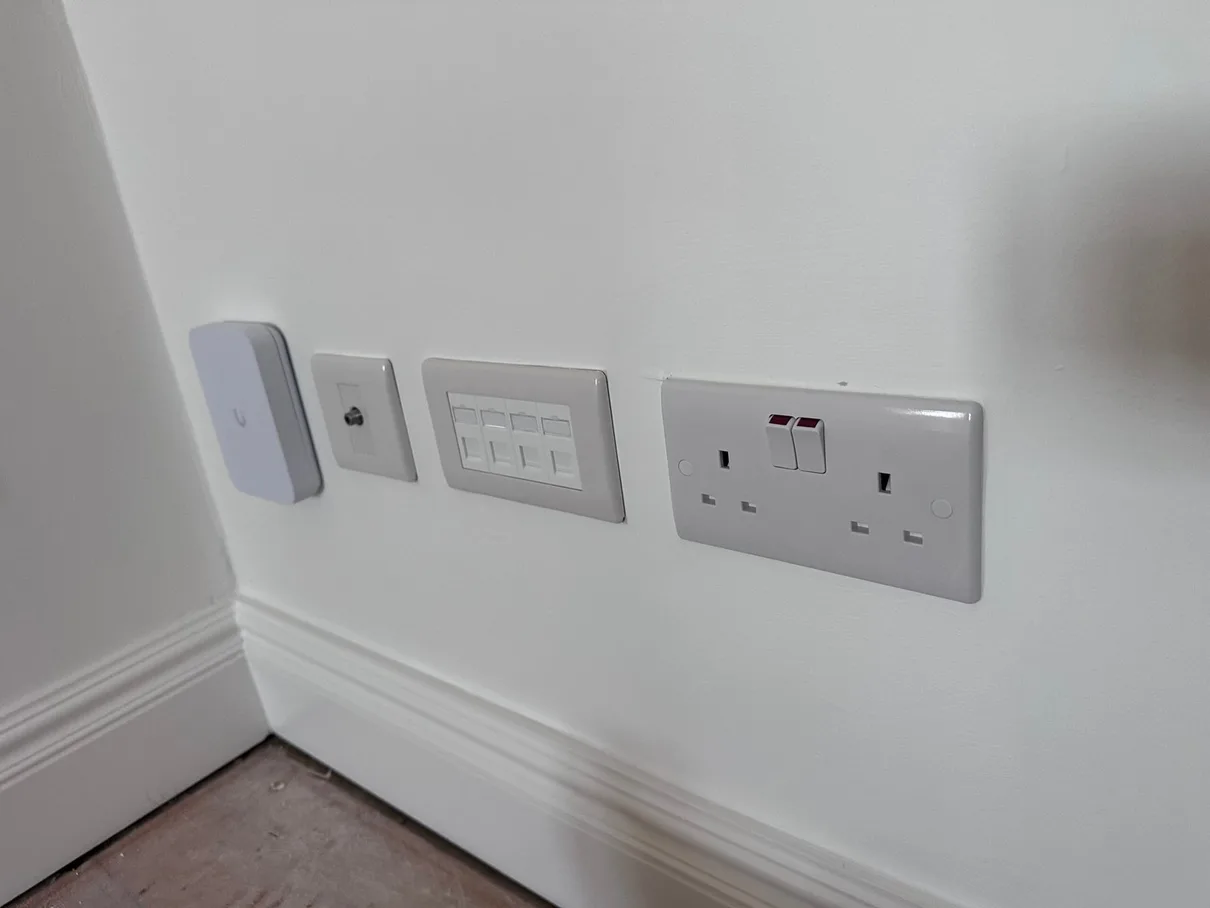
Ubiquiti access point and four-port Cat6 data plate installed by Rudi Electrics
Real commercial network detailWired WiFi and fixed data connections planned as one maintainable system.

The plan before the equipment

One business network planned around the people and systems using it.

Coverage, wired devices, payment systems, guest access and working-hour constraints are agreed before equipment is selected. Installed Cat6 is tested and labelled, with UniFi or TP-Link Omada equipment configured for the agreed network roles.

SurveyedRequirements, routes and equipment positions
Cat6Every installed run tested and labelled
DocumentedPorts and system ownership explained
12 monthsWorkmanship guarantee

The questions customers ask first

Your Commercial Network Questions Answered

The network has to support the business without creating avoidable disruption, hidden dependencies or a system nobody can maintain later.

Explore the four questions01 / 04

Start with the people and premises

Business Environments This Service Supports

The design follows the systems, opening hours and customer areas of the actual premises.

Swipe through the business situations

  • 01

    For Shops & Retail

    Reliable connections for tills, stock systems and customer WiFi.

    Card machines that don't drop mid-transaction, stock-scanning devices that stay connected, and free customer WiFi kept separate from your till network — all designed in from the start.

  • 02

    For Offices

    stable connectivity for every desk, call and file transfer.

    Wired desk points, correctly placed access points, and VLANs that keep staff devices, guest WiFi and security systems apart. Wired connections and correctly positioned access points reduce avoidable WiFi bottlenecks for calls and file transfers.

  • 03

    For Cafés & Restaurants

    Fast guest WiFi that kept separate from point-of-sale traffic.

    Customers expect free WiFi — but it shouldn't share bandwidth or network access with your card machine and kitchen systems. I keep them on separate, secure networks from day one.

The infrastructure behind the result

What We Can Install for a North London Business

Structured cabling, wired WiFi and managed equipment are specified as one system after the premises and operational requirements have been surveyed.

Swipe through the installation options

  1. 01

    Multi-Gig Structured Cabling

    Cat6 runs to the rooms that need wired connections, with Cat6a available where full-distance 10-gigabit capability is required, terminated to keystone RJ45 wall sockets and a patch panel. Rated for 2.5G and 10G, so multi-gigabit internal transfers and NAS access are possible where the cabling run and connected equipment support them. Every drop tested for connectivity and labelled.

  2. 02

    WiFi 6E / WiFi 7 on Wired Backhaul

    Ceiling and wall access points hardwired back on Cat6a — not daisy-chained mesh hops that halve your speed. One SSID, fast roaming across every floor and out onto the shop floor or dining area, and usable throughput where it used to drop. WiFi 6E and WiFi 7 ready.

  3. 03

    VLAN Segmentation & Firewall

    Separate, firewalled networks for Staff, Till/POS, CCTV and Guest WiFi. Firewall rules control exactly what can talk to what — so correctly configured firewall rules can restrict IoT devices from reaching work devices and file storage. This is the single biggest security upgrade most homes are missing.

  4. 04

    CCTV & IoT on Isolated Networks

    Your CCTV, alarm and building-management devices live on their own VLAN — able to do their job, walled off from everything else. Cameras record to the NVR without touching the internet or your main LAN. PoE means one Cat6a run powers each device, no wall-warts.

  5. 05

    Managed Gateway & Switching

    A proper gateway and PoE-managed switch (Ubiquiti UniFi or TP-Link Omada) replaces the ISP all-in-one, which goes into bridge mode. Single-pane management, per-device controls and remote monitoring — so I can support and tune your network without a call-out.

  6. 06

    Network Rack, Patch Panel & Handover

    Everything terminated neatly in a wall-mounted rack — gateway, switch, patch panel and power in one tidy spot. You get a labelled patch panel, a network diagram and documented VLANs, so any future work is quick and clean.

Real installation detail

Real Network Work From North London Properties We Serve.

Completed Cat6, access-point, testing and network-cabinet details from the Rudi Electrics portfolio.

Swipe through genuine network installation details01 / 06

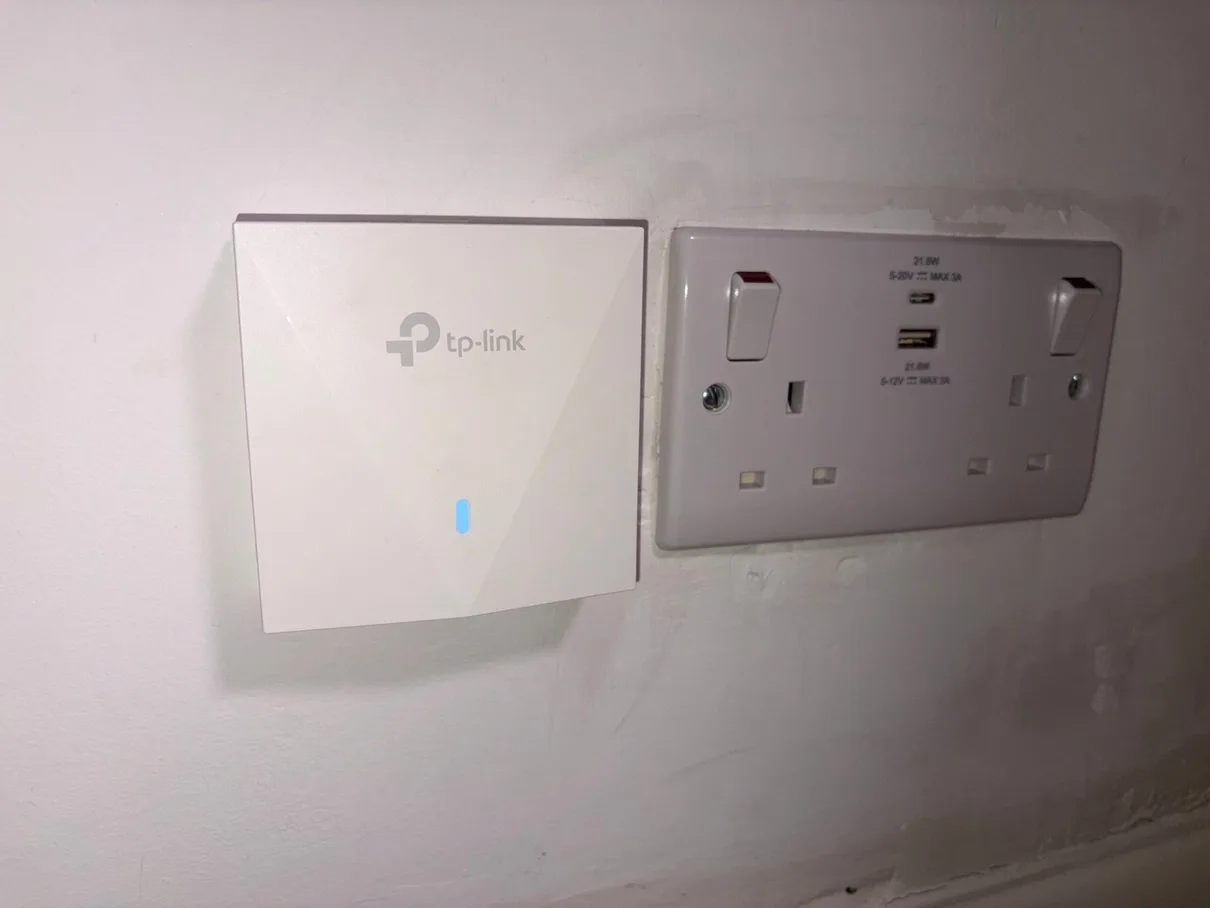
TP-Link WiFi access point and USB socket installation in North London
Installation 01TP-Link EAP flush-mounted access point — wired backhaul, coverage planned around the agreed areasInstalled, tested and presented as part of a maintainable network.
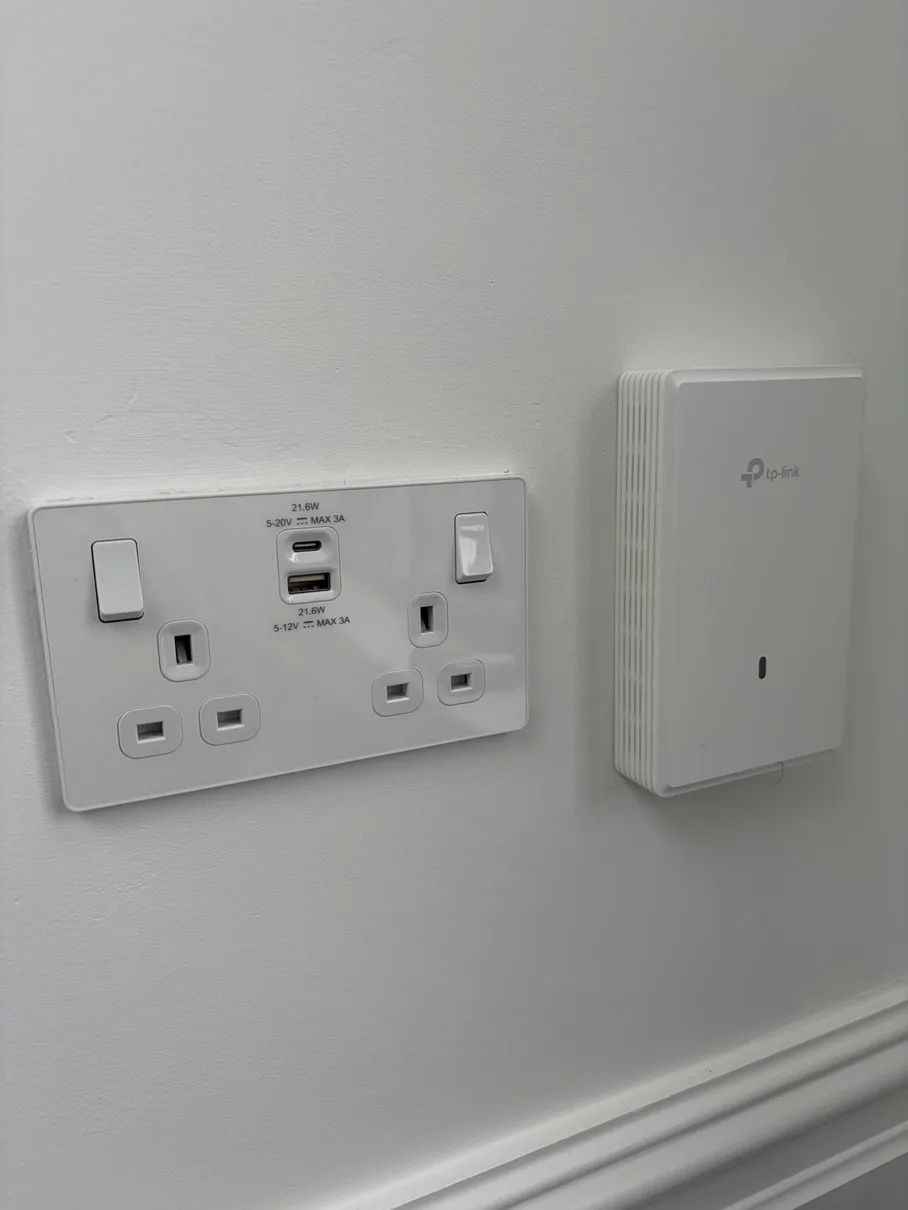
TP-Link EAP access point with double USB socket — home network installation North London
Installation 02TP-Link EAP with double USB socket — power and connectivity in one neat installInstalled, tested and presented as part of a maintainable network.
Ubiquiti access point, CAT6 data points and double socket — home network North London
Installation 03Ubiquiti access point, 4-port CAT6 data plate and double socket — all on one wallInstalled, tested and presented as part of a maintainable network.
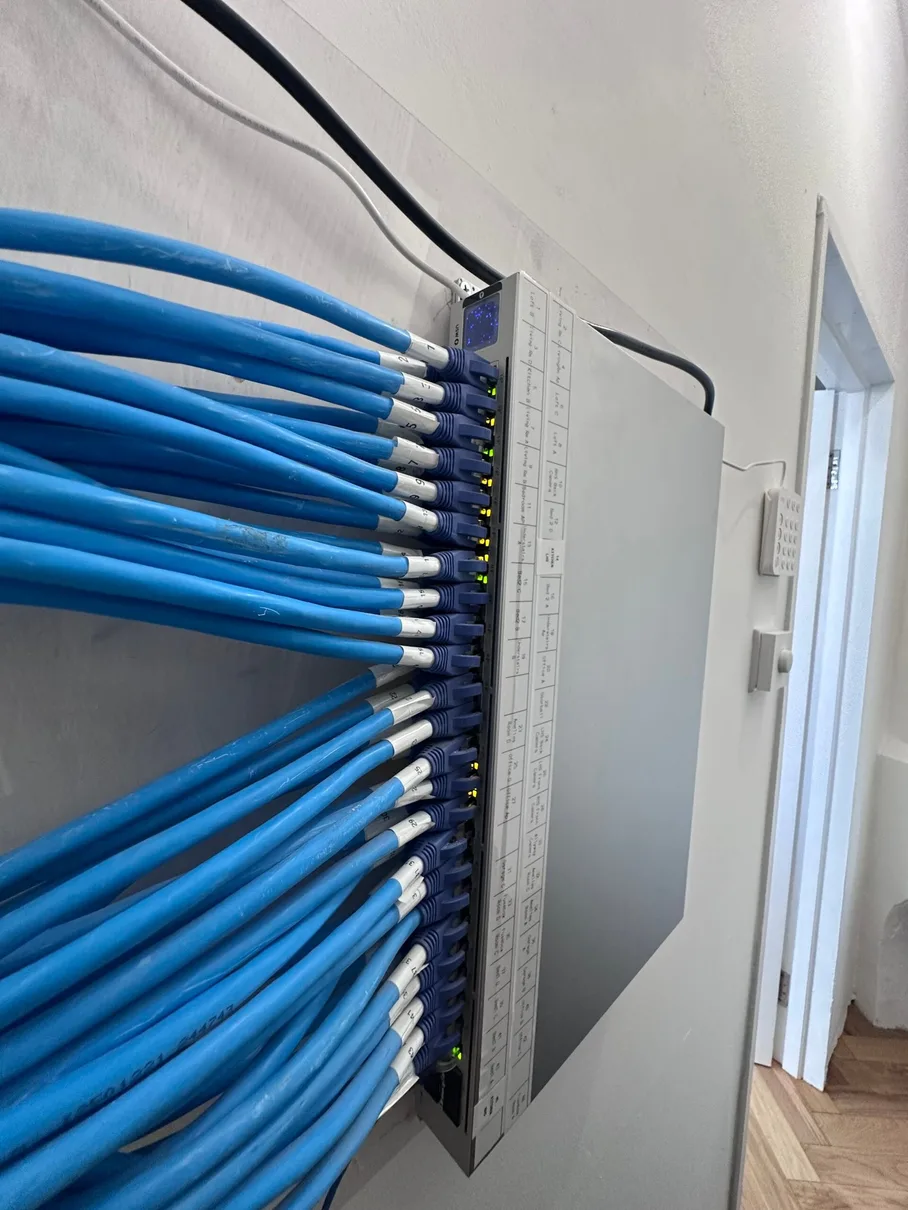
24-port CAT6 patch panel — structured home network installation North London
Installation 0424-port CAT6 patch panel — every room, every floor, all labelled and testedInstalled, tested and presented as part of a maintainable network.
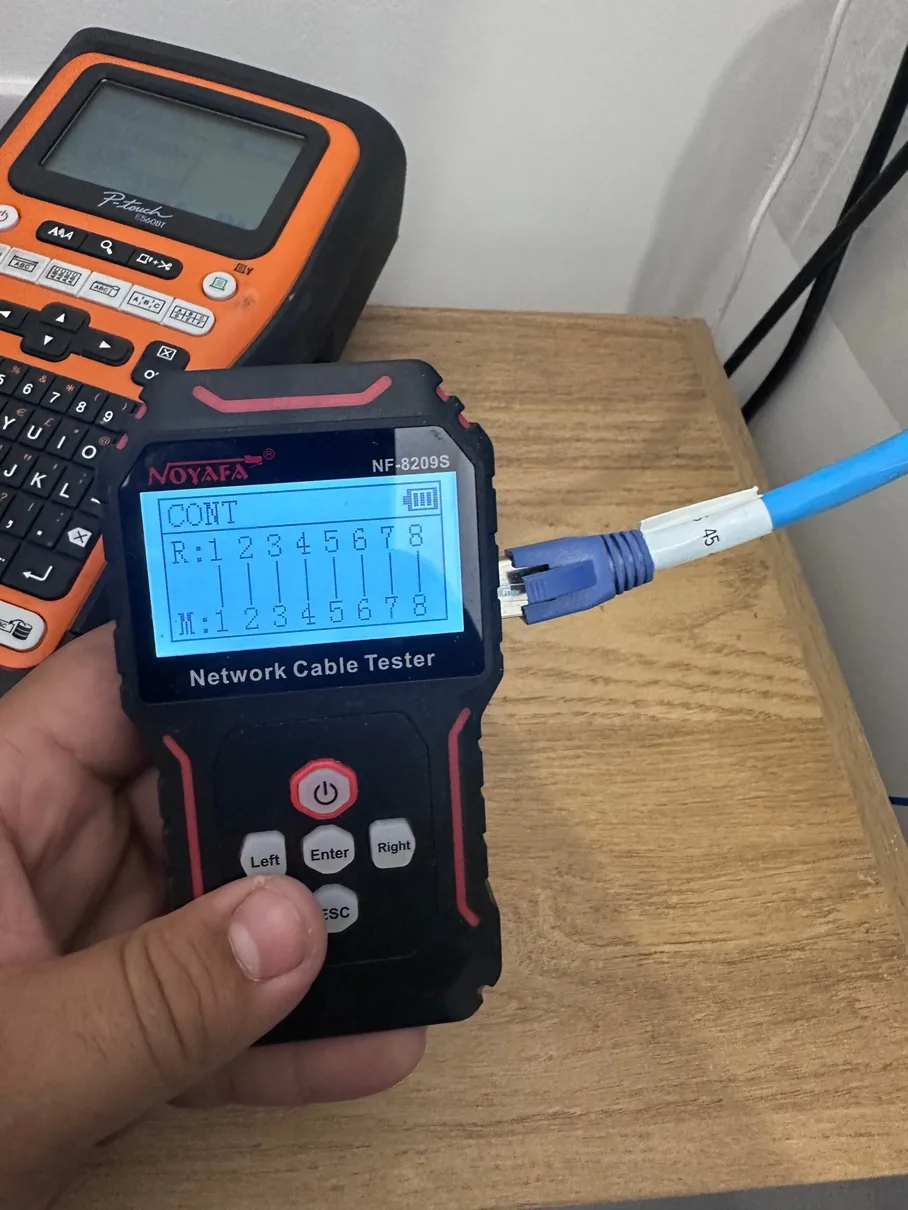
Network cable testing — every run verified before handover
Installation 05Every cable tested with a Noyafa tester before we close up — no faults passed overInstalled, tested and presented as part of a maintainable network.
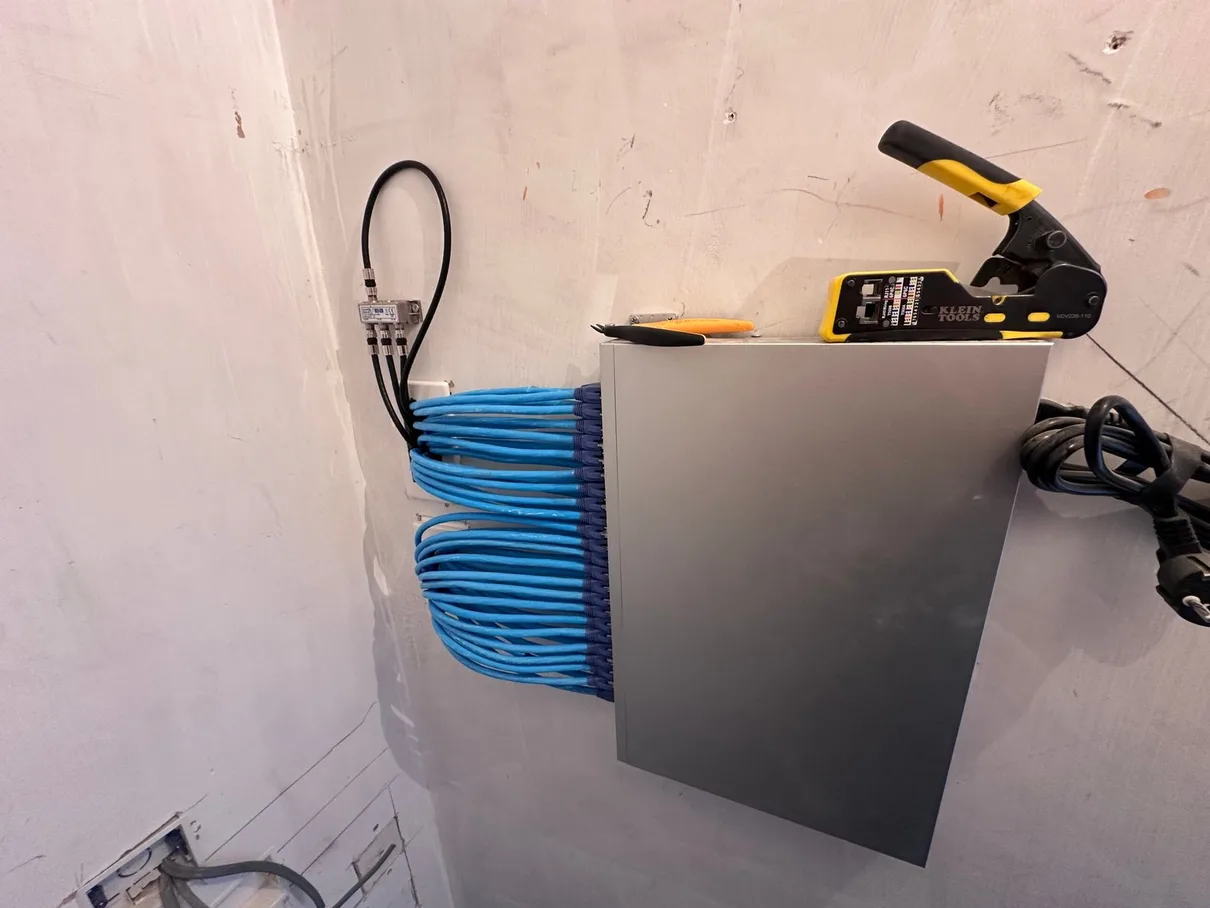
Network cabinet with CAT6 runs and TV aerial point — North London
Installation 06Network cabinet with all CAT6 runs terminated — clean install, ready for switchInstalled, tested and presented as part of a maintainable network.

What Our Customers Say About Us

Below are our live Google reviews. For all 388+ reviews across Google, Checkatrade and MyBuilder, see the testimonials page →

From survey to documented handover

How We Complete a Commercial Network Installation

A clear route from premises survey to tested, labelled and documented handover.

Swipe through the installation process

  1. 01

    Free Site Survey

    We visit your premises to assess layout, construction, and usage requirements. We identify optimal cable routes, access point locations, discuss your connectivity needs, and agree a schedule that works around your trading hours.

  2. 02

    Custom Design & Quote

    We create a bespoke network design with cable plans, equipment specifications, and a detailed written quote covering labour and all materials. The agreed scope and any options are itemised.

  3. 03

    Cable Installation

    Professional CAT6 cabling installed through walls, ceilings, and voids. We use proper cable management, trunking where needed, and protect your property throughout.

  4. 04

    Termination & Testing

    All cables are terminated to professional RJ45 sockets or patch panels. We test every connection for continuity and negotiated link performance against the installed cabling and connected equipment.

  5. 05

    Equipment Setup

    If you're having WiFi access points or network equipment installed, we configure everything for the agreed operation — including SSID setup, security, and clean handover between access points.

  6. 06

    Testing & Handover

    system testing against the agreed scope, speed verification, and demonstration. You receive documentation, WiFi passwords, and guidance on managing your new network infrastructure.

Scope before a fixed quotation

Commercial Network & WiFi Packages

Quick reference for North London shops, offices, cafés and restaurants. Every tier is quoted after a free site survey — scope varies too much by premises to give a fixed floor price.

Swipe to compare network scopes

01ESSENTIAL WIFI

Kill the dead spots

  • Access point install or upgrade
  • Optimised channels & one strong SSID
  • Full coverage where you need it
  • Ideal for single-till shops & cafés
Request a site survey Quoted after free survey • No hidden extras
03SEGMENTED PRO

Fast & secure by design

  • Everything in Whole-Site Wired, plus:
  • VLAN segmentation — guest, staff, POS & CCTV apart
  • Managed gateway, firewall & secure remote access
  • Network diagram & documented handover
Request a site survey Quoted after free survey • No hidden extras

Final price confirmed after a free site survey. No obligation.

The premises changes the plan

Different Premises Create Different Network Priorities

A shop floor, office, café and practice do not share the same device mix, opening hours or security boundaries. These examples show how the plan changes.

Explore the customer contexts01 / 03

Swipe or use the arrows

Straight answers before a survey

Commercial Network & WiFi FAQ — Honest Answers About Dead Zones, Cabling & Guest WiFi

Thirteen straight answers for shop, office, café and restaurant owners. Anything missing — call 07932 772050.

01What does commercial network installation cost, and how is it quoted?

Every commercial installation is quoted after a free site survey — there's no fixed floor price because the scope varies hugely between a single-till café and a multi-room office.

We walk the premises, plan cable routes, count access points needed, and check what your till, kitchen or office equipment actually requires. You get a written fixed quote before any work begins — no daily-rate creep, no surprises on the invoice.

What changes the quote: number of network points, cable routing complexity, managed switch/patch panel needs, number of access points, and any VLAN segmentation for guest/staff/POS separation.

Looking for network installation at a single residential home rather than a business premises? See our Home Network & WiFi Installation page instead.

02Why do shops, cafés and offices get WiFi dead zones — what actually fixes them?

WiFi blackspots in commercial premises come from the same physics as anywhere else — signal weakens through brick walls, chillers, stock, and distance from the router. Common patterns: a stockroom or back office with no signal at all, a dining area where only the tables near the router get reliable WiFi, or an upstairs office that's permanently patchy.

The fix is a properly designed network, not a stronger single router: wired access points positioned after a site survey, so coverage is even across the whole premises — not just wherever the ISP router happened to get plugged in.

03Structured cabling vs mesh WiFi — which is right for my business premises?

For most commercial premises, structured Cat6 cabling with wired access points wins. Mesh systems daisy-chain wirelessly between units, which halves throughput with each hop — noticeable when several staff devices, a POS system and guest WiFi are all sharing the same access point.

Wired access points on structured cabling give you one strong SSID, full-speed coverage everywhere, and no bottleneck as more devices join. Mesh only makes sense for a very small single-room premises where running cable genuinely isn't practical.

04Is our current business broadband router good enough, or do we need to upgrade?

Most ISP-supplied routers (BT, Sky, Virgin, EE business broadband) are fine as the internet connection itself, but weak as the WiFi and network hub for a commercial premises — limited range, no VLAN support, and no way to properly separate guest WiFi from your till or office systems.

We typically put the ISP router into modem/bridge mode and replace it with a proper gateway and managed switch (UniFi or Omada), then run structured cabling to wired access points. Same internet connection, properly distributed.

05Can you set up guest WiFi that's completely separate from our till or POS system?

Yes — this is one of the most requested commercial jobs we do. Guest WiFi runs on its own VLAN with its own firewall rules, so a customer's phone has no route at all to your till, card machine, or office network. Staff devices can sit on a third, separate VLAN if you want that split too.

This isn't just convenient — running guest and payment devices on the same flat network is a real security risk most business owners don't realise they're taking until it's pointed out.

06How many access points does a shop floor, café or small office need?

It depends on the floor plan, construction, and how many devices need to connect at once — not just floor area. A single-room café might need one well-placed access point; a shop with a stockroom and mezzanine, or an office with several separate rooms, usually needs two to four.

We work this out properly at the free site survey rather than guessing — walking the premises, checking wall construction, and testing signal before recommending a number.

07Can you install without disrupting our trading hours?

Yes. Site surveys and installs can be scheduled before opening, after closing, or on your quietest trading day — whatever causes the least disruption to your business. Most of the cabling and first-fix work can also be phased so the premises stay open throughout.

08Why does our card machine or POS system keep losing connection?

Usually one of three things: the card machine is sharing an overloaded WiFi network with guest devices and other equipment, it's too far from the access point for a reliable signal, or it's on a consumer router that drops connections under load.

The fix is a dedicated, wired connection for the till/POS point wherever possible, or a properly placed access point on its own prioritised VLAN if it has to be wireless — either way, isolated from guest WiFi traffic so it's never competing for bandwidth.

09UniFi, Omada or Netgear business gear — which do you install and why?

We install and configure Ubiquiti UniFi and TP-Link Omada — both give you managed switching, VLAN support, and centralised control of every access point from one app, which is what makes guest/staff/POS separation possible in the first place.

UniFi tends to suit premises that want the most polished management interface and room to expand; Omada is a strong budget-conscious alternative with the same core VLAN and management capability. We'll recommend one based on your premises and budget at the site survey — not a one-size-fits-all answer.

10Will you also cover the stockroom, back office or staff area?

Yes — these are exactly the areas that get missed when a business only has the WiFi that came with the broadband. We include stockrooms, back offices, staff rooms and any upper floors in the site survey so the whole premises is covered, not just the customer-facing area.

11Do you offer VLAN segmentation, guest WiFi separation and ongoing support?

Yes to all three. VLAN segmentation keeps guest, staff, POS and CCTV traffic on separate, firewalled networks. Every installation includes full app setup and a handover so you know how to manage guest WiFi yourself day-to-day. We're also available for ongoing support and any future changes as your business grows.

12What's the install process, and how much disruption should we expect?

Free site survey first — we assess the premises and agree a schedule around your trading hours. Then structured cabling is installed through walls, ceilings and voids with proper cable management. Every cable is terminated and tested before access points and switching are configured. Finally, full testing and a handover so you know exactly what's been installed and how to use it.

Most single-premises jobs complete in one to two visits, scheduled to minimise impact on trading.

13Can you run cabling through walls, floors or ceilings without disrupting our fit-out?

Yes — we route cable through voids, above suspended ceilings, and under floors wherever possible to avoid visible trunking. Where a cable has to run on show, we use trunking matched to the wall or skirting colour. We agree cable routes with you before any drilling starts, so there are no surprises to your shopfit or decor.

Rudi from Rudi Electrics

Surveyed, installed and explained by one team

Need a Commercial Network in North London?

Arrange a premises survey for structured Cat6, wired access points, managed switching, guest and staff networks, or a complete business-network installation.

Site surveyTested Cat6Clear labelling12-month guarantee
Rudi — network and electrical installation

Network routes, outlets, equipment positions and handover are agreed around the premises. Where associated electrical work forms part of the scope, it is inspected, tested and certified as applicable by NICEIC-Registered Electrician D609991.

Book Your Free Commercial Network Site Survey

Tell us about your property and what you need — we'll respond during working hours to discuss the scope and prepare a written quotation.

🔍

Premises Survey

Requirements, equipment positions and practical routes agreed before installation.

🔌

Tested Cat6

Installed links checked and labelled at both ends before handover.

📋

Clear Handover

Ports, retained equipment, accounts and any limitations recorded clearly.

12-Month Guarantee

Our workmanship is covered for 12 months after completion.

Sending your enquiry…

🔒 We use your information to handle your enquiry and related records. Any optional advertising measurement requires your separate permission; see our Privacy Policy. We'll respond during working hours.

Site Survey Request Sent!

Thanks, we'll respond during working hours to discuss your home network project.